Edit Billing Info
The Edit Billing Information screen allows you to update your address and credit card information.
To manage the people who receive invoices and other billing emails, see Manage billing contacts.
Update address
To update your billing address:
-
Navigate to Settings > Account settings > Billing > Edit Billing Info.
-
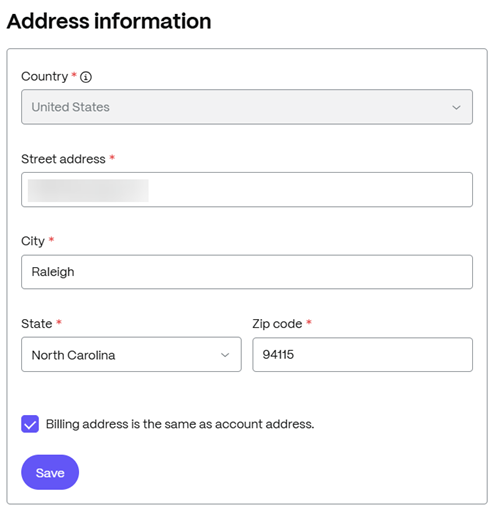
From the Address information section:
- Select the Country – Contact our Sales team for assistance if you need to change the country.
- Enter the Street address.
- Enter the City name.
- Select the State.
- Add the Zip code.
- Select the box to confirm if the billing address is the same as the account address.
-
Click Save.
Update credit card
You can add, edit, or delete credit card information.
Note:
Updates to billing information can take up to 24 hours to appear.
Add a new card
To add a new credit card:
-
Navigate to Settings > Account settings > Billing > Edit Billing Info.
-
Select Edit in the Credit Card Information section:
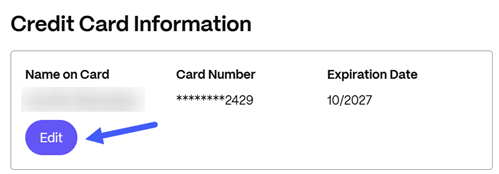
The Add/Edit payment card screen displays.
-
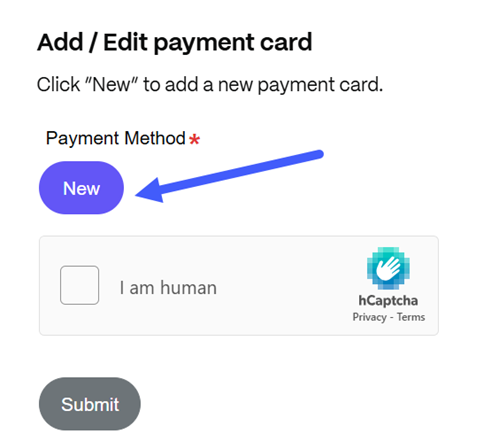
From the Add/Edit payment card screen, select New to add a payment card.
-
Provide the following information:
- Card number
- Card type – choose from American Express, Discover, MasterCard, or VISA
- Expiration date (MM/YYYY)
- Cardholder's information: First Name, Last Name, Address, City, Country, State, Zip/Postal Code, Phone Number, and Email.
-
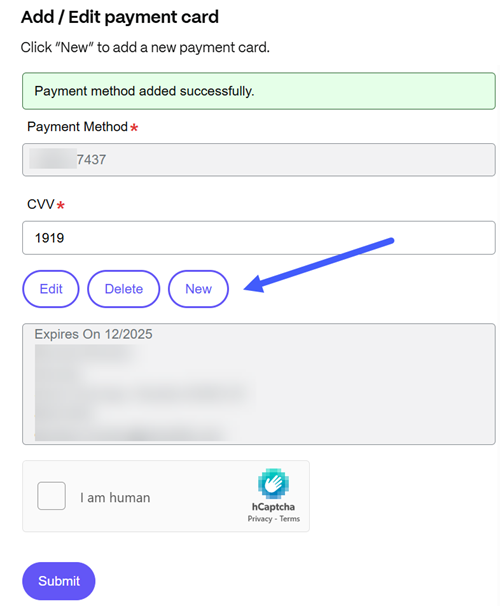
Select Save. A confirmation message appears when the payment method is added:
-
Enter your card's CVV.
-
Select the Captcha box to confirm you are a human.
-
Select Submit. A temporary $1 USD authorization is placed when you update your credit card information. Your bank automatically releases the authorization within a few days.
After you add a card, select Edit to update its information or Delete to remove it. If you cannot update a payment card, contact ShareFile Support.
-