Connectors
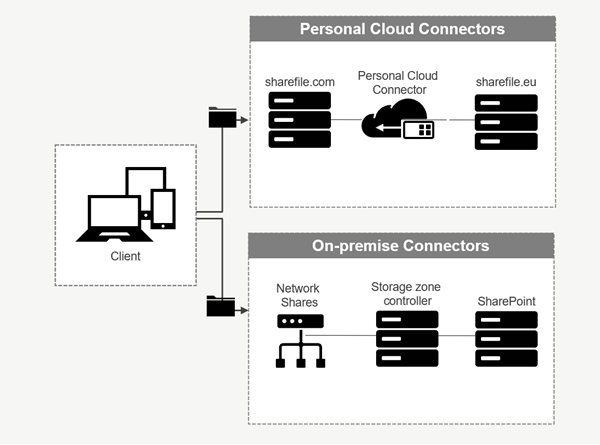
Connectors allow employees to access files and folders stored on a connected on-premises or cloud-based resource. Users can use the web application and ShareFile apps to view and interact with data stored in connected locations.
| Connector type | Description | Supported services |
|---|---|---|
| ShareFile Cloud Connectors | Allows ShareFile account users access to personal cloud-based data storage services within ShareFile apps. Users can download, upload, move, copy, and delete data within these connected resources. These connectors require each user to authenticate with their service credentials. Users must and allow the ShareFile service to communicate with the permitted cloud-based service. | Office 365, OneDrive for Business, SharePoint Online, Dropbox, Box, OneDrive, Google Drive |
| On-premises Connectors | On-premises connectors allow users to access data locations within Network file shares or as SharePoint sites. These connectors require an additional configuration of storage zone controller in a local environment. | SharePoint sites, collections, libraries, Network file shares |
Supported apps
| App type | Supported |
|---|---|
| Web app | Latest version |
| Mobile apps | iOS, Android, Universal Windows Platform |
| Desktop apps | ShareFile |
Connector types
The following connector types can be enabled once:
- Box
- Dropbox
- Google Drive
- OneDrive
Alternatively, the remaining connectors require additional configuration. The following connector types can configure multiple connections for user access:
-
On-premise connections
-
OneDrive for Business
-
SharePoint Online
Please note an Office 365 administrator must add the ShareFile Connector for Office 365 to secure ShareFile service access to Office 365 data.
Notes and limitations
| Item | Description |
|---|---|
| On-Prem Customer Restrictions | Personal Cloud Connectors are supported for accounts utilizing Customer-Managed storage zones that are associated with ShareFile-Managed storage zones. This feature is not available to accounts with no association to a ShareFile-Managed storage zone including on-prem or tenant setups. |
| Limitation | File uploads to Personal Cloud or SharePoint Online currently have a maximum upload size of 200 MB per file. |
| Limitation | File uploads to the OneDrive for Business Connector currently has a maximum upload size of 16GB. |
| Limitation | Connectors must have a unique display name. Users are blocked from using a connector name that is currently in use elsewhere on the account. |
| Limitation | Actions such as browsing folders or downloading files may fail when using Safari web browser. To resolve any issues, please ensure cookies are allowed in your Safari system preferences. |
| Limitation | Shared folders in Google Drive are not supported. |