Import a list of clients users
You can create multiple client users at once by downloading an Excel template spreadsheet. To import users:
-
Sign into ShareFile.
-
Select People > Manage users home > create client contact.
The Create new client contact screen displays.
-
Select Need to import multiple users with Excel?
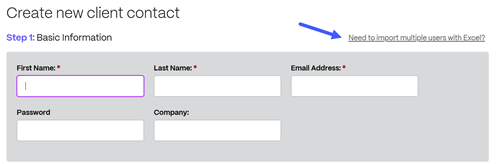
The Import Multiple Users From Excel screen displays:
-
In Step 1 - Download the template spreadsheet and add as many users as desired. Enter the Email Address, First Name, Last Name and Company for each user. Then, Save the file.
-
In Step 2 - Upload the completed Excel Spreadsheet.
-
Once the file is uploaded, select Import Users. The user's basic information is filled.
-
Select Assign Folders to give the user access to folders.
-
Select Create & Continue and then Notify.