Download and view files using ShareFile for Android
Updated on Oct 30, 2026
The following steps explain how to download files in ShareFile using your Android device.
-
Using your device, navigate to the folder holding the file(s) you want to download.
-
Tap the file. The file displays.
-
Tap the vertical ellipses for the menu.
-
Tap Open In.
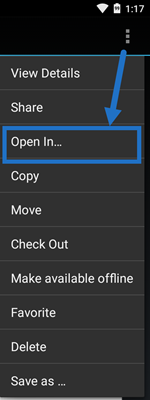
The app you select depends on the type of file you download. Select the corresponding application to the file you selected.