Download files from the ShareFile web app
To download files from the ShareFile web application:
-
Navigate to the folder containing the file(s) to download.
-
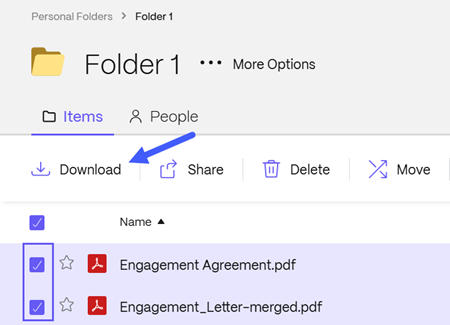
Select the file(s) you want to download.
-
Select Download.
Download files using drag and drop
You can also download files by dragging the file name from the ShareFile web application to a folder on your computer. This downloads a copy and doesn't remove the file from ShareFile.
- Navigate to the folder containing the file you want to download.
- Select and hold the file name, then drag it to a folder on your computer.
- Release the mouse button to start the download.
Download files shared by email
The steps to download files shared by email depend on whether the sender requires you to sign in.
Download files without signing in
- Open the email from ShareFile.com or the sender.
- Select the download link.
- Enter the requested user information.
- Download the shared files.
Download files from an encrypted email
-
Open the email from the sender.
-
Select the download link.
-
Enter your client information.
-
If this is your first time accessing ShareFile, create a password.
-
Sign in with your credentials.
-
Download the shared files.
Note: If you do not receive the email, check your spam or junk folder. Emails might come from the sender or from
sf-notifications.comon the sender's behalf.