Export a Request List
You can export a Request List to an Excel (.xlsx) or CSV (.csv) file to keep an offline copy, perform custom analysis, or share the data outside of ShareFile.
To export a Request List:
-
From your ShareFile account, go to Projects.
-
Select an existing project to open it.
-
Go to the Tasks tab and open the Request List you want to export.
-
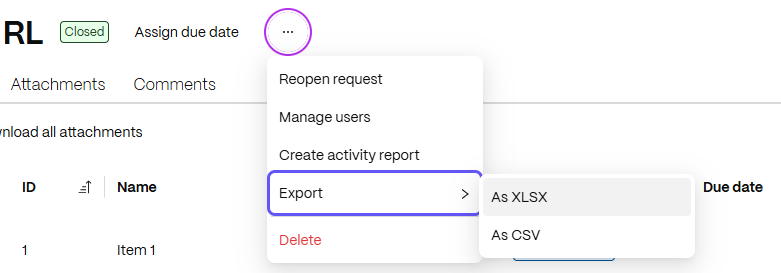
Select the three-dot menu and hover over Export.
-
Select As XLSX or As CSV.
An asynchronous download begins. A toast notification confirms that the file is being generated. When the download is complete, the file is saved to your browser's default download location.
Note:
The exported columns reflect the columns currently active in the Request List items table view.
Exported file structure
The exported file contains two sections:
- Summary rows — high-level metadata about the Request List
- Item rows — one row per item in the Request List
Summary rows
The top rows include high-level metadata about the Request List:
| Field | Description |
|---|---|
| Request List Name | The name of the Request List |
| # in Draft | Number of items in Draft status |
| Waiting on Client | Number of items waiting on the client |
| Ready for Review | Number of items ready for review |
| Approved | Number of approved items |
| Status | Overall status of the Request List |
| Due Date | The due date of the Request List |
Item rows
Below the summary, each row represents one item in the Request List:
| Column | Description |
|---|---|
| ID | Unique identifier for the item |
| Name | Name of the item |
| Status | Item status (Draft, Open, Waiting on Client, Ready for Review, Approved) |
| Due Date | Due date for the item |
| Assigned To | User assigned to the item |
| Categories | Categories applied to the item |
| Number of Attachments | Total number of files attached to the item |
| Number of Comments | Total number of comments on the item |