Version and End Of Life check for ShareFile for Windows
Use the two sets of directions in this article to do a standard version check or an end-of-life (EOL) check when using ShareFile for Windows.
Download ShareFile for Windows installer files from here.
Version check - ShareFile for Windows
Use the following steps to locate the version of ShareFile for Windows you're currently using.
-
Navigate to the Windows system tray.
-
Right click on the ShareFile logo, then select Help.
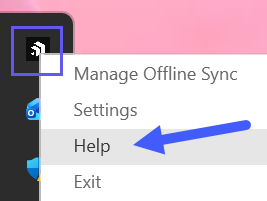
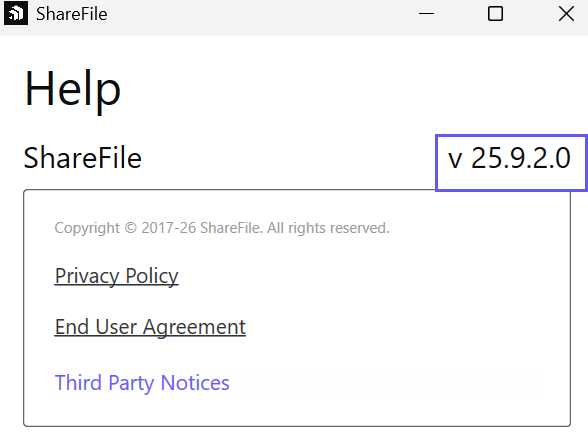
The Help section displays allowing you to view the version number in the top right.
End Of Life version check - ShareFile for Windows
-
Navigate to the Windows system tray.
-
Right click on the ShareFile logo, then select Help.
The Help section displays allowing you to view the version number in the top right.
Note:
We support the four most current versions of ShareFile for Windows. Check Document history for updates to the ShareFile for Windows application.
-
To confirm your client version of ShareFile for Windows is EOL, continue to the next step to check the recent log.
-
Navigate to
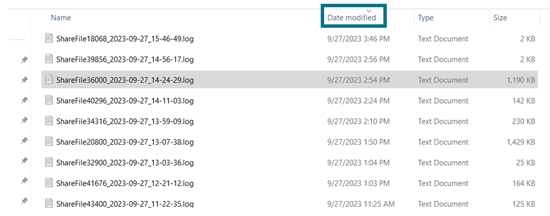
C:\Users\%Username%\AppData\Local\Sharefile\ShareFile for Windows\Logsin your Windows file explorer. -
Order the files by clicking the Date modified column.
-
Search for the following keywords:
- End Of Life
- EOL
If either of the keywords are found and exception message similar to the following will display.
