You're not viewing the latest version of the documentation, do you want to switch?
Architecture overview
This section provides an overview to deploying storage zones controller for proof-of-concept evaluations or high-availability production environments. High-availability deployment is shown both with and without a DMZ proxy.
To evaluate a deployment with multiple storage zones controllers, follow the guidelines for a high availability deployment.
Each of the deployment scenarios require a ShareFile Enterprise account. By default, ShareFile stores data in the secure ShareFile managed cloud. To use private data storage, either an on-premises network share or a supported third-party storage system, configure storage zones for ShareFile Data.
To securely deliver data to users from network file shares or SharePoint document libraries, configure storage zone connectors.
Storage zones controller proof of concept deployment
Caution:
A proof-of-concept deployment is intended for evaluation purposes only and should not be used for critical data storage.
A proof-of-concept deployment uses a single storage zones controller. The example deployment discussed in this section has both storage zones for ShareFile Data and storage zone connectors enabled.
To evaluate a single storage zones controller, you can optionally store data in a folder (such as C:\ZoneFiles) on the hard drive of the storage zones controller instead of on a separate network share. All other system requirements apply to an evaluation deployment.
Proof-of-concept deployment for standard storage zones
A storage zones controller configured for standard zones must accept in-bound connections from the ShareFile cloud. To do that the controller must have a publicly accessible internet address and SSL enabled for communications with the ShareFile cloud. The following figure indicates the traffic flow between user devices, the ShareFile cloud, and storage zones controller.
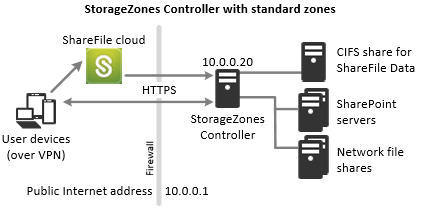
In this scenario, one firewall stands between the Internet and the secure network. Storage zones controller resides inside the firewall to control access. User connections to ShareFile must traverse the firewall and use the SSL protocol on port 443 to establish this connection. To support this connectivity, you must open port 443 on the firewall and install a public SSL certificate on the IIS service of the storage zones controller.
Storage zones controller high availability deployment
For a production deployment of ShareFile with high-availability, the recommended best practice is to install at least two storage zones controllers. When you install the first controller, you create a storage zone. When you install the other controllers, you join them to the same zone. Storage zones controllers that belong to the same zone must use the same file share for storage.
In a high availability deployment the secondary servers are independent, fully functioning storage zones controllers. The storage zones control subsystem randomly chooses a storage zones controller for operations. If the primary server goes offline, you can easily promote a secondary server to primary. You can also demote a server from primary to secondary.
High availability deployment for standard zones
Storage zones controllers configured for standard storage zones must accept in-bound connections from the ShareFile cloud. To do that each controller must have a publicly accessible internet address and SSL enabled for communications with the ShareFile cloud. You can configure multiple external public addresses, each associated with a different storage zones controller.The following figure shows a high availability deployment for standard storage zones.
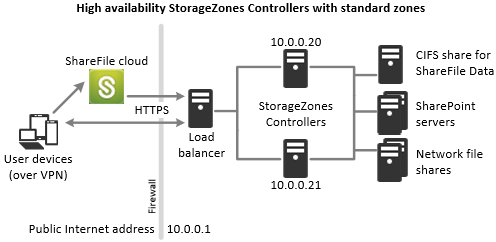
Similar to the Proof-of-concept deployment scenario above, one firewall stands between the Internet and the secure network. The storage zones controllers reside inside the firewall to control access. User connections to ShareFile must traverse the firewall and use the SSL protocol on port 443 to establish this connection. To support this connectivity, you must open port 443 on the firewall and install a public SSL certificate on the IIS service of all storage zones controllers.
Shared storage configuration
Storage zones controllers that belong to the same storage zone must use the same file share for storage. Storage zones controllers access the share using the IIS Account Pool user. By default, application pools operate under the Network Service user account, which has low-level user rights. A storage zones controller uses the Network Service account by default.
You can use a named user account instead of the Network Service account to access the share. To use a named user account, specify the user name and password in the storage zones console Configuration page. Run the IIS application pool and the ShareFile Services using the Network Service account.
Network connections
Network connections vary based on the type of zone — ShareFile managed or standard.
ShareFile managed zones
The following table describes the network connections that occur when a user logs on to ShareFile and then downloads a document from a ShareFile managed zone. All connections use HTTPS.
| Step | Source | Destination |
|---|---|---|
1. User logon request | Client | company.sharefile.com:443 |
2. (Optional) Redirect to SAML IdP logon | Client | SAML Identity Provider URL |
3. File/folder enumeration and download request | Client | company.sharefile.com:443 |
4. File download | Client | storage-location.sharefile.com:443 |
Standard storage zones
The following table describes the network connections that occur when a user logs on to ShareFile and then downloads a document from a standard storage zone. All connections use HTTPS.
| Step | Source | Destination |
|---|---|---|
1. User logon request | Client | company.sharefile.com |
2. (Optional) If using ADFS, redirect to SAML IdP logon | Client | SAML Identity Provider URL |
3. File/folder enumeration and download request | Client | company.sharefile.com |
4. File download authorization | company.sharefile.com | szc.company.com |
5. File download | Client | szc.company.com |
Storage zones controller DMZ proxy deployment
A demilitarized zone (DMZ) provides an extra layer of security for the internal network. A DMZ proxy is an optional component used to:
-
Ensure all requests to a storage zones controller originate from the ShareFile cloud, so that only approved traffic reaches the storage zones controllers.
storage zones controller has a validate operation that checks for valid URI signatures for all incoming messages. The DMZ component is responsible for validating signatures before forwarding messages.
-
Load balance requests to storage zones controllers using real-time status indicators.
Operations can be load-balanced to storage zones controllers if they all can access the same files.
-
Offload SSL from storage zones controllers.
-
Ensure requests for files on SharePoint or network drives are authenticated before passing through the DMZ.