Antivirus scan for ShareFile managed storage zones
Files uploaded to ShareFile cloud storage go through an antivirus scan for malware detection and restricts infected files.
There are three levels of virus strictness setting for ShareFile accounts:
- Virus Strictness 0: Only warns while share / download of infected files.
- Virus Strictness 1: Block sharing / download of infected files. Shows icon for infected files.
- Virus strictness 2: Block sharing / download of infected AND unscanned files. Shows icon for unscanned and infected files.
Virus Strictness 1 is the default setting for customers to control the spread of infected files internally and externally.
Notes:
ShareFile is rolling out strict security controls with Virus strictness 1 on ShareFile accounts. Any content identified as malicious is quarantined and blocked from sharing and for user download.
The Virus strictness changes are only applicable to ShareFile Managed cloud storage. Virus strictness does not apply to customer managed storage zones.
Antivirus scan improvements
Faster scan response time
Customers can upload and collaborate on any file type and size without worrying about the danger of malicious content. Any file that gets uploaded to ShareFile is scanned for malicious content within industry benchmark speeds.
Reduced risk and control the spread of malware
ShareFile reduces risk and protects users from further spreading of malicious content by quarantining the file. Certain actions are disabled for the file like download and share.
If the AV scan engine identifies the file as malicious, users are notified with an icon next to the uploaded file name in the dashboard.
The screen displays the icon for infected files and how actions are disabled for the end-user.
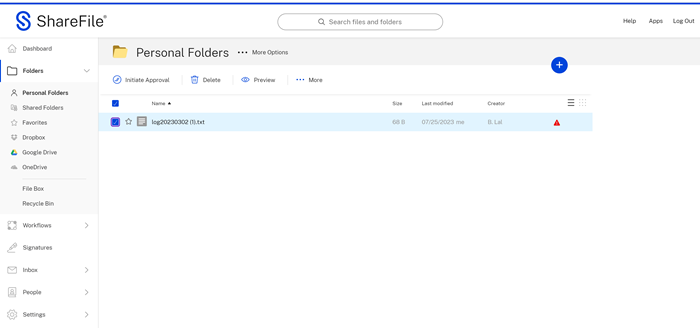
During this time, users are guided on the next steps. This includes deleting the malicious content by selecting the icon. An automated message displays a warning:
Malicious file detected:
We detected malicious content and have restricted access to this file.
We recommend that you delete it.
Contact your administrator if you think this is an error.
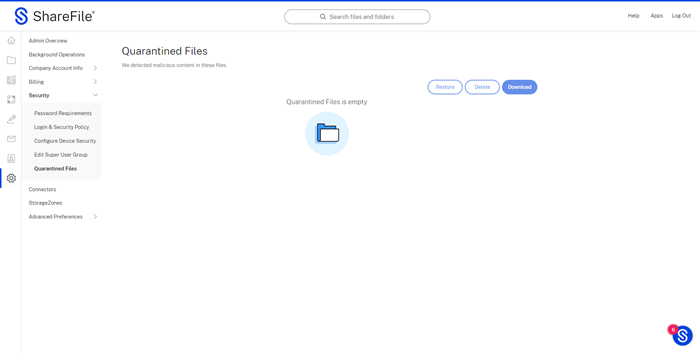
As malicious content is identified, ShareFile provides real time alerts allowing main administrators to evaluate the threat and take immediate action. The email alert provides information about who uploaded the file, the type of malware, and other details. To provide maximum flexibility to Super User Group, we now provide a Quarantined Files folder where details of all infected files uploaded to ShareFile can be accessed and appropriate action can be taken to reduce risk. The following image displays the Quarantined Files folder in ShareFile.