-
-
GlobiFlow for Podio for Quality Assurance Cycles
-
Implement a payment form in Podio using Globiflow and Jotform
-
This content has been machine translated dynamically.
Dieser Inhalt ist eine maschinelle Übersetzung, die dynamisch erstellt wurde. (Haftungsausschluss)
Cet article a été traduit automatiquement de manière dynamique. (Clause de non responsabilité)
Este artículo lo ha traducido una máquina de forma dinámica. (Aviso legal)
此内容已经过机器动态翻译。 放弃
このコンテンツは動的に機械翻訳されています。免責事項
이 콘텐츠는 동적으로 기계 번역되었습니다. 책임 부인
Este texto foi traduzido automaticamente. (Aviso legal)
Questo contenuto è stato tradotto dinamicamente con traduzione automatica.(Esclusione di responsabilità))
This article has been machine translated.
Dieser Artikel wurde maschinell übersetzt. (Haftungsausschluss)
Ce article a été traduit automatiquement. (Clause de non responsabilité)
Este artículo ha sido traducido automáticamente. (Aviso legal)
この記事は機械翻訳されています.免責事項
이 기사는 기계 번역되었습니다.책임 부인
Este artigo foi traduzido automaticamente.(Aviso legal)
这篇文章已经过机器翻译.放弃
Questo articolo è stato tradotto automaticamente.(Esclusione di responsabilità))
Translation failed!
GlobiFlow for Podio for Quality Assurance Cycles
Simplified Innovations manages the IT infrastructure for their CPA clients. This involves managing multiple virtual disk images containing pre-specified software applications.
For a list of FAQs regarding the CPA clients, see here FAQ
Workflow Automation
Now Simplified Innovations uses GlobiFlow for Podio to automate most of the QA cycle steps. In this video, we show this real-world automation on a set of demo data:
As you can see from this video, the tedious tasks of managing QA cycles has been reduced to a simple click of a button, and the chance of important upgrades being missed has been significantly reduced.
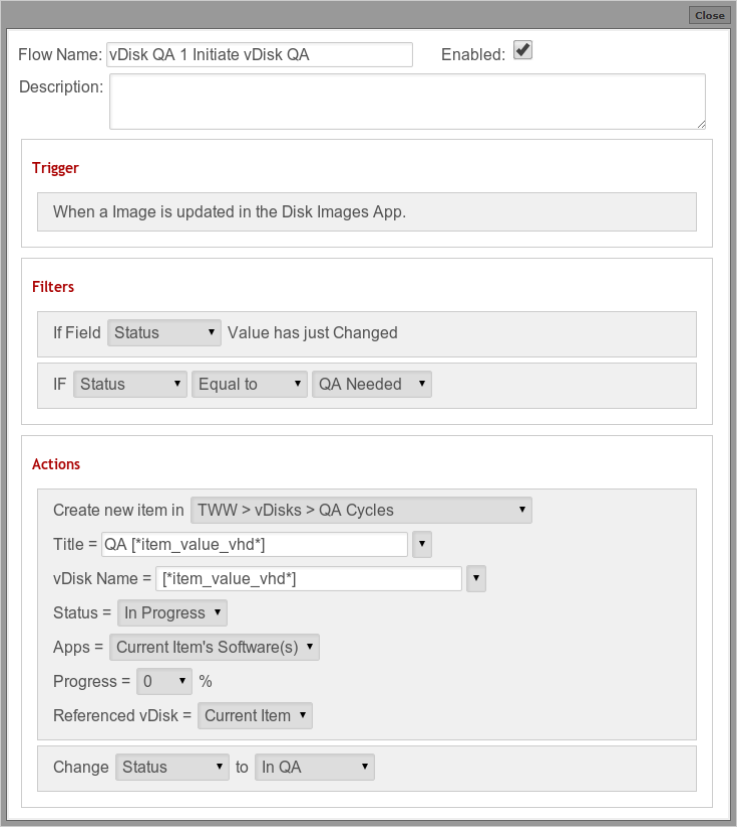
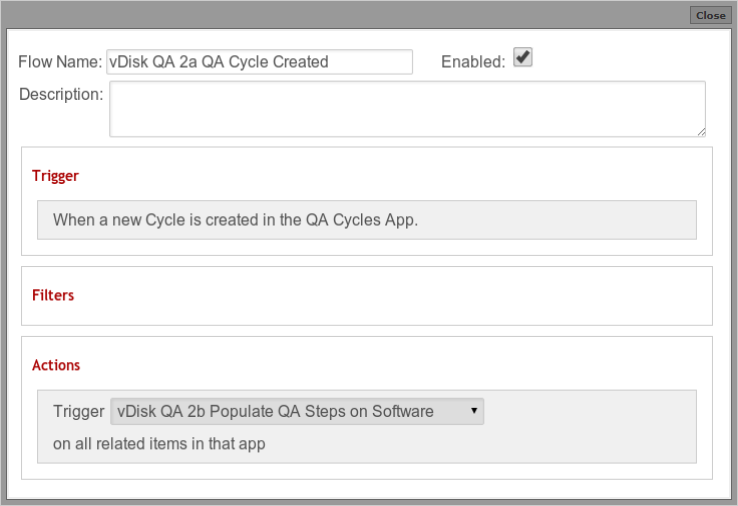
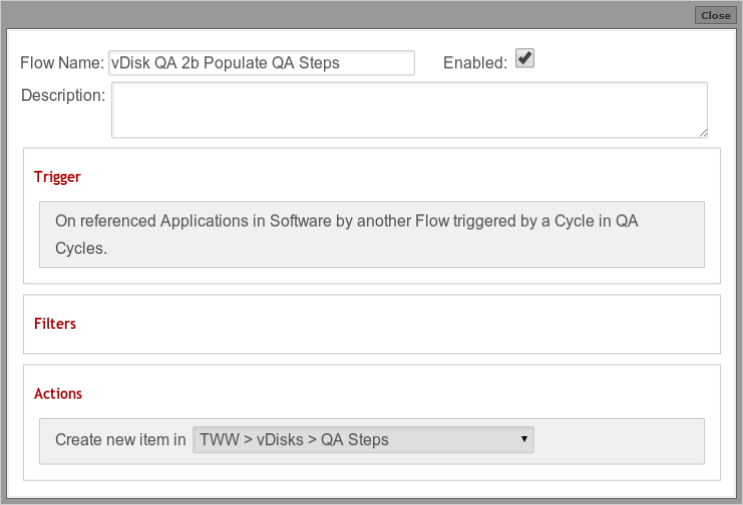
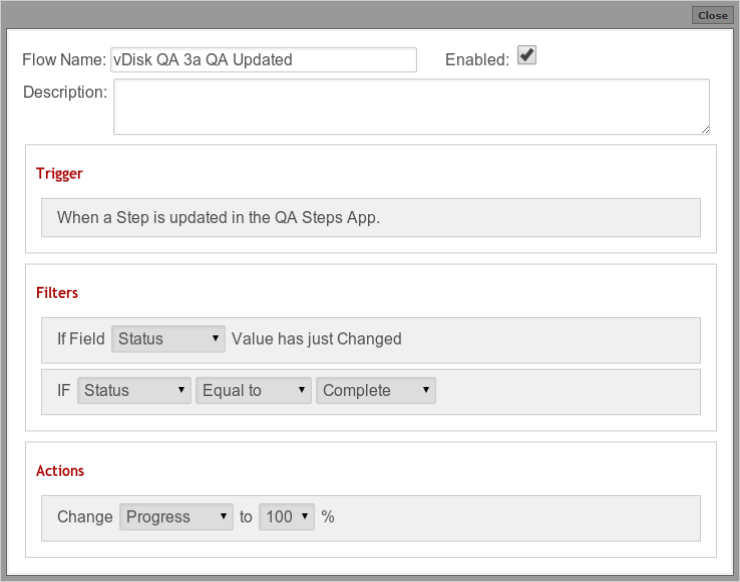
Here are the Flow steps as defined in GlobiFlow for Podio to achieve this automation in their Podio Workspace:
-
1 Initiate vDisk QA
-
2a QA Cycle Created
-
2b Populate QA Steps
-
3a QA Updated
-
3b Trigger progress update
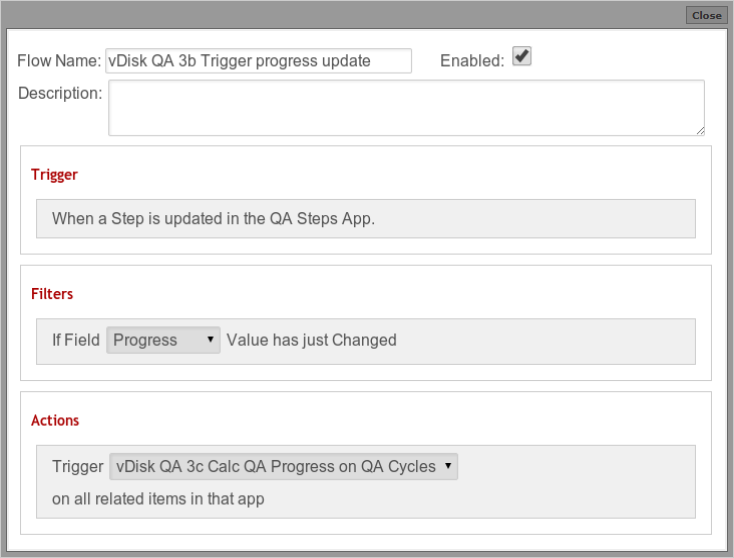
-
3c Calc QA Progress
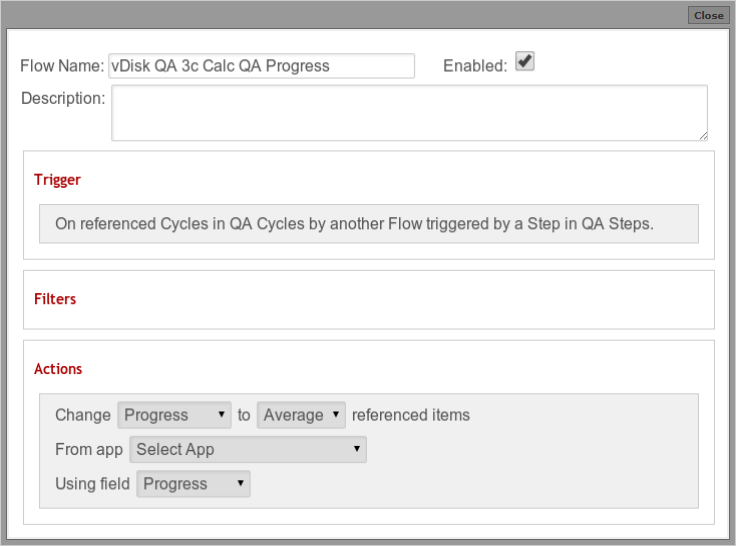
-
4a is QA Cycle Complete?
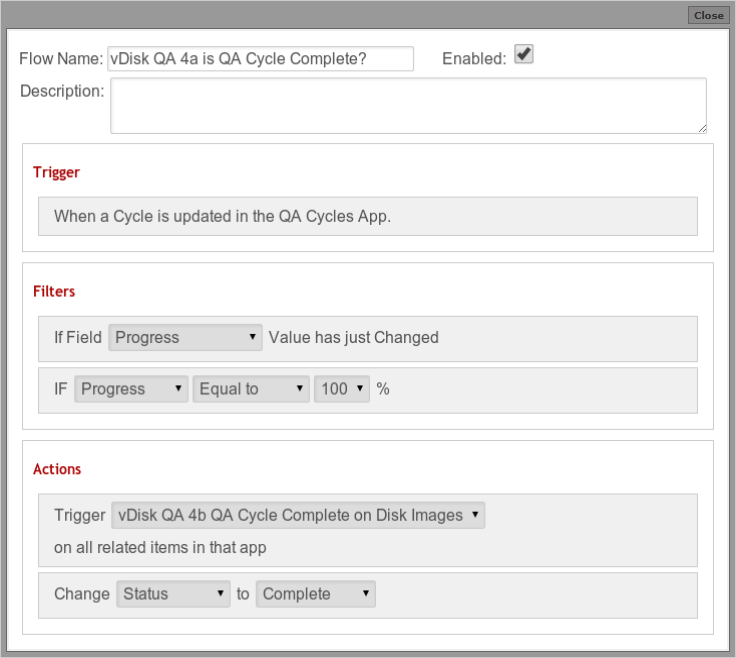
-
4b QA Cycle Complete
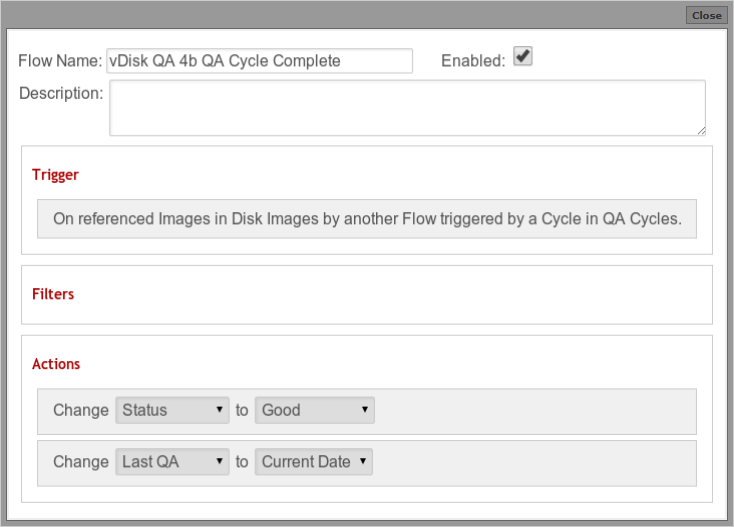
FAQ
Would you please give us a brief overview of what you do for your clients?
At Simplified Innovations, we provide a secure and remote desktop designed for CPA’s. We manage access, security, backups and application updates. To improve the delivery of the hosted desktop, and reduce management costs and server image drifting, we leverage Citrix Provisioning Server or PVS.
What has been your biggest challenge in managing these server images?
Each client has a specific set of applications, specific to their firm specialty. Because we are CAP focused, application updates can affect more than one client. So when application X needed an update, we needed a way to identify which server images (vDisks) to update.
How has GlobiFlow for Podio helped you overcome these challenges?
Delivering timely application updates in the CPA industry is critical. Often updates impact tax calculation, payroll deductions and more. Using GlobiFlow for Podio allows us to automatically identify the vDisks that require updates and complete them in the next maintenance window or sooner. Integrating GlobiFlow for Podio with our existing Podio workspaces has revolutionized what can be accomplished. I personally see it as an essential add on to any Podio deployment.
Share
Share
In this article
This Preview product documentation is Citrix Confidential.
You agree to hold this documentation confidential pursuant to the terms of your Citrix Beta/Tech Preview Agreement.
The development, release and timing of any features or functionality described in the Preview documentation remains at our sole discretion and are subject to change without notice or consultation.
The documentation is for informational purposes only and is not a commitment, promise or legal obligation to deliver any material, code or functionality and should not be relied upon in making Citrix product purchase decisions.
If you do not agree, select I DO NOT AGREE to exit.