Use Section Separator Fields to organize Podio App Items
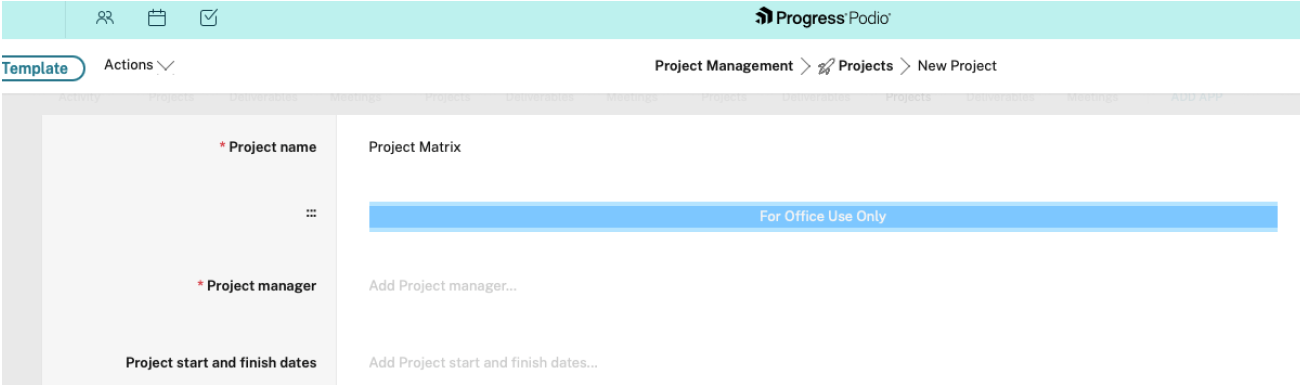
The Section Separator Field is a “layout” field type in Podio Web that helps visually organize app item views by dividing fields into clearly defined sections. This improves readability in apps with many fields and replaces the need for workaround “calculation” field separator solutions.
Overview
The Section Separator Field provides a native way to structure item layouts without affecting data, reports, or automations. It replaces the need for calculation fields previously used as visual separators.
The Section Separator field is available in Podio Web item view only. Mobile apps and webforms do not support this field type.
How to add a Section Separator Field
- Open the app and select Modify Template.
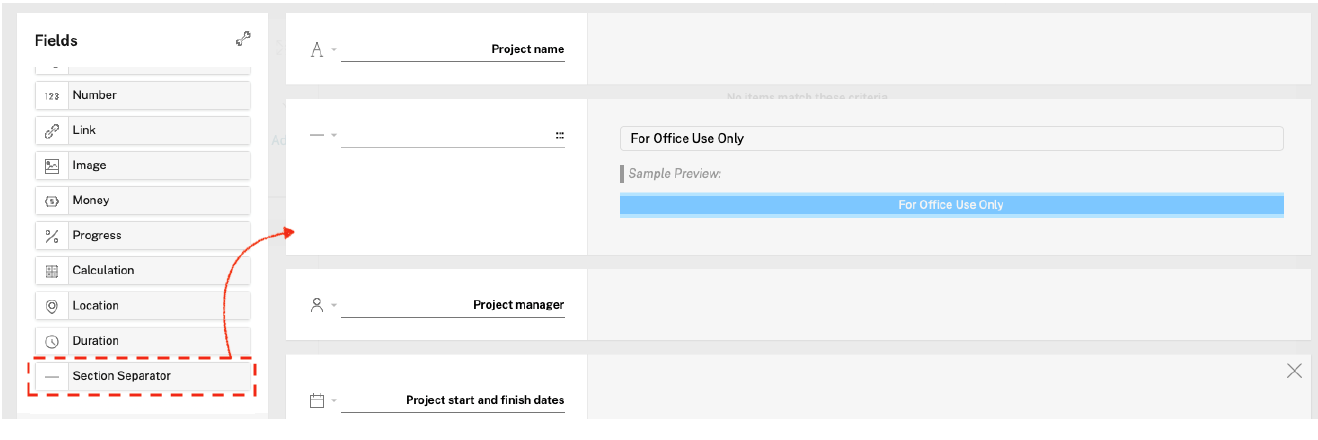
- Drag and drop the Section Separator Field into the layout.
- Optionally update the field name on the left.
- Enter section title content in the Field value box.
- Open the field configuration dropdown.
- Select Basic Mode or Advanced Mode.
-
Preview changes and save.
Configuration Options
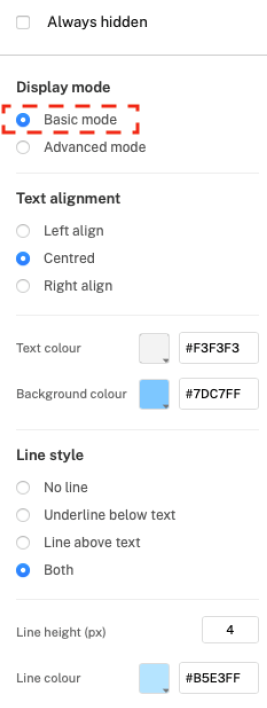
Basic Mode
Basic Mode provides predefined styling options such as text alignment, line placement, colors, and line height.
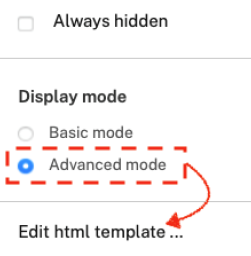
Advanced Mode
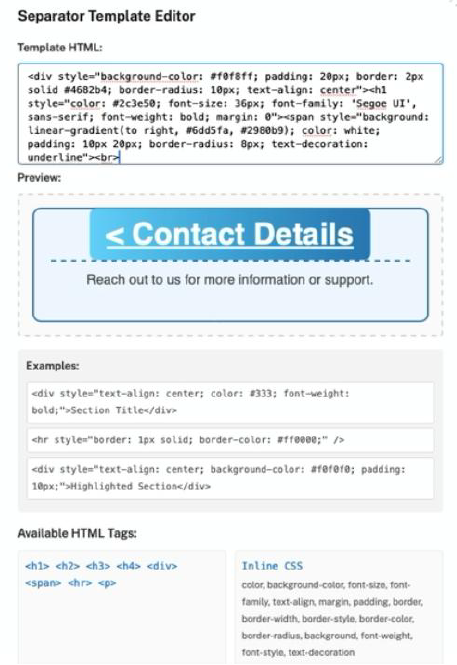
Advanced Mode supports limited HTML and inline CSS for advanced styling. You can apply a wide variety of styling options, such as color, background, borders, margins, padding, fonts, alignment, and many others.
Supported tags: </div>, </span>, </hr>, </p>, </h1>–</h4>
Migrating from Calculation-Based Separators
You can improve overall app performance by transitioning calculation-based separators to Section Separator Fields over time. However, please avoid deleting all calculation-based separators in a single day. Phasing the deletions over several days allows you to test the new separator fields gradually and helps prevent large delete operations during work hours.
Behavior and Limitations
- Section Separator Fields are read-only. You can modify them only from the app template
- You cannot use or reference separators inside Workflow Automations
- Filters, Reports, and App exports do not include Section Separator fields
- Mobile apps and webforms do not display Section Separators
- Advanced Mode limits you to safe HTML/CSS (no scripts, external resources, or rich text editors)
- Advanced Mode limits each field to 1,000 characters
The official version of this content is in English. Some of the Cloud Software Group documentation content is machine translated for your convenience only. Cloud Software Group has no control over machine-translated content, which may contain errors, inaccuracies or unsuitable language. No warranty of any kind, either expressed or implied, is made as to the accuracy, reliability, suitability, or correctness of any translations made from the English original into any other language, or that your Cloud Software Group product or service conforms to any machine translated content, and any warranty provided under the applicable end user license agreement or terms of service, or any other agreement with Cloud Software Group, that the product or service conforms with any documentation shall not apply to the extent that such documentation has been machine translated. Cloud Software Group will not be held responsible for any damage or issues that may arise from using machine-translated content.
DIESER DIENST KANN ÜBERSETZUNGEN ENTHALTEN, DIE VON GOOGLE BEREITGESTELLT WERDEN. GOOGLE LEHNT JEDE AUSDRÜCKLICHE ODER STILLSCHWEIGENDE GEWÄHRLEISTUNG IN BEZUG AUF DIE ÜBERSETZUNGEN AB, EINSCHLIESSLICH JEGLICHER GEWÄHRLEISTUNG DER GENAUIGKEIT, ZUVERLÄSSIGKEIT UND JEGLICHER STILLSCHWEIGENDEN GEWÄHRLEISTUNG DER MARKTGÄNGIGKEIT, DER EIGNUNG FÜR EINEN BESTIMMTEN ZWECK UND DER NICHTVERLETZUNG VON RECHTEN DRITTER.
CE SERVICE PEUT CONTENIR DES TRADUCTIONS FOURNIES PAR GOOGLE. GOOGLE EXCLUT TOUTE GARANTIE RELATIVE AUX TRADUCTIONS, EXPRESSE OU IMPLICITE, Y COMPRIS TOUTE GARANTIE D'EXACTITUDE, DE FIABILITÉ ET TOUTE GARANTIE IMPLICITE DE QUALITÉ MARCHANDE, D'ADÉQUATION À UN USAGE PARTICULIER ET D'ABSENCE DE CONTREFAÇON.
ESTE SERVICIO PUEDE CONTENER TRADUCCIONES CON TECNOLOGÍA DE GOOGLE. GOOGLE RENUNCIA A TODAS LAS GARANTÍAS RELACIONADAS CON LAS TRADUCCIONES, TANTO IMPLÍCITAS COMO EXPLÍCITAS, INCLUIDAS LAS GARANTÍAS DE EXACTITUD, FIABILIDAD Y OTRAS GARANTÍAS IMPLÍCITAS DE COMERCIABILIDAD, IDONEIDAD PARA UN FIN EN PARTICULAR Y AUSENCIA DE INFRACCIÓN DE DERECHOS.
本服务可能包含由 Google 提供技术支持的翻译。Google 对这些翻译内容不做任何明示或暗示的保证,包括对准确性、可靠性的任何保证以及对适销性、特定用途的适用性和非侵权性的任何暗示保证。
このサービスには、Google が提供する翻訳が含まれている可能性があります。Google は翻訳について、明示的か黙示的かを問わず、精度と信頼性に関するあらゆる保証、および商品性、特定目的への適合性、第三者の権利を侵害しないことに関するあらゆる黙示的保証を含め、一切保証しません。
ESTE SERVIÇO PODE CONTER TRADUÇÕES FORNECIDAS PELO GOOGLE. O GOOGLE SE EXIME DE TODAS AS GARANTIAS RELACIONADAS COM AS TRADUÇÕES, EXPRESSAS OU IMPLÍCITAS, INCLUINDO QUALQUER GARANTIA DE PRECISÃO, CONFIABILIDADE E QUALQUER GARANTIA IMPLÍCITA DE COMERCIALIZAÇÃO, ADEQUAÇÃO A UM PROPÓSITO ESPECÍFICO E NÃO INFRAÇÃO.