This content has been machine translated dynamically.
Dieser Inhalt ist eine maschinelle Übersetzung, die dynamisch erstellt wurde. (Haftungsausschluss)
Cet article a été traduit automatiquement de manière dynamique. (Clause de non responsabilité)
Este artículo lo ha traducido una máquina de forma dinámica. (Aviso legal)
此内容已经过机器动态翻译。 放弃
このコンテンツは動的に機械翻訳されています。免責事項
이 콘텐츠는 동적으로 기계 번역되었습니다. 책임 부인
Este texto foi traduzido automaticamente. (Aviso legal)
Questo contenuto è stato tradotto dinamicamente con traduzione automatica.(Esclusione di responsabilità))
This article has been machine translated.
Dieser Artikel wurde maschinell übersetzt. (Haftungsausschluss)
Ce article a été traduit automatiquement. (Clause de non responsabilité)
Este artículo ha sido traducido automáticamente. (Aviso legal)
この記事は機械翻訳されています.免責事項
이 기사는 기계 번역되었습니다.책임 부인
Este artigo foi traduzido automaticamente.(Aviso legal)
这篇文章已经过机器翻译.放弃
Questo articolo è stato tradotto automaticamente.(Esclusione di responsabilità))
Translation failed!
Podio Vendor Name and Tax Billing Changes
Overview of changes
- Vendor Name Update
Beginning October 22, 2025, charges on your credit card will appear as: Progress Software Corporation (previously Citrix Systems, Inc).
- Tax Component Introduction
Depending on your location, your Podio invoices may now include applicable taxes.
Country-specific tax guidance
United States
If you are tax-exempt, email your Sales Tax Exemption Certificate for each exempt state to: taxoutreach@progress.com
Include:
- Podio organization name
- Email address of the Contract Owner
- Contract number (if applicable)
Required seller information:
Progress Software Corporation 15 Wayside Road, Ste. 400 Burlington, MA 01803
Europe
VAT registrations:
- United Kingdom: GB 379 2640 63
- EU (IOSS – Netherlands): EU528003544
You may now add your VAT number in your Podio billing settings.
Canada
Registered to collect:
- GST
- HST
- QST
- Provincial Sales Tax (PST)
You may now add your PST registration number in your Podio billing settings.
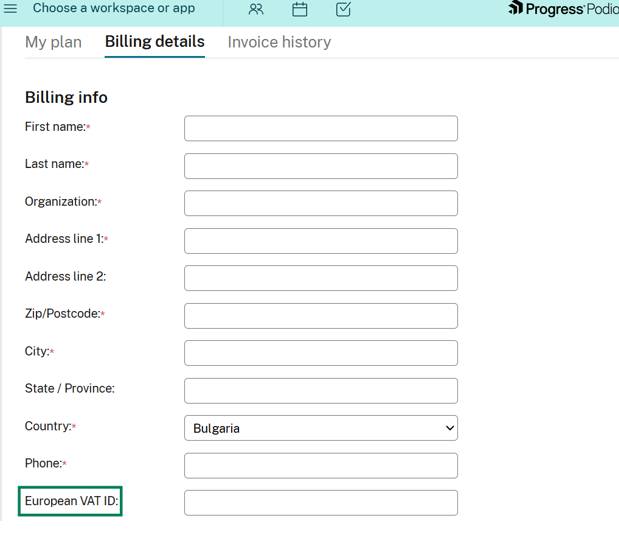
Required actions before becoming tax exempt
-
Verify Billing information
- Confirm your address
- Ensure your VAT ID has been added to the Podio Billing page
- Ensure required fields are complete
- Correct invalid entries
- Add VAT or PST Details - If new tax ID fields appear, enter your organization’s registration number.
- Submit Tax Exemption Certificates - Send certificates to taxoutreach@progress.com
IMPORTANT:
Invalid or incomplete billing details may result in failed payments, renewal issues, or restricted access. Please verify all billing information is up to date.
Need help?
For any billing questions not related to tax exemptions, please chat with the Podio Billing Support team. Our Tax team is unable to assist with non–tax exemption inquiries.
Share
Share
This Preview product documentation is Citrix Confidential.
You agree to hold this documentation confidential pursuant to the terms of your Citrix Beta/Tech Preview Agreement.
The development, release and timing of any features or functionality described in the Preview documentation remains at our sole discretion and are subject to change without notice or consultation.
The documentation is for informational purposes only and is not a commitment, promise or legal obligation to deliver any material, code or functionality and should not be relied upon in making Citrix product purchase decisions.
If you do not agree, select I DO NOT AGREE to exit.