Automated Threat Remediation
Automated Threat Remediation identifies and responds to high-severity security threats in real time. By using machine learning models to detect unusual activity, ShareFile can take predetermined actions without waiting for manual intervention.
Automated remediation reduces the time between detection and response while helping protect user data and platform integrity. It also lets security teams focus on strengthening defenses instead of responding to every incident manually.
Behavioral alerts
User and Entity Behavior Analytics (UEBA) helps you identify unusual account and file activity in ShareFile. An alert is a reason to investigate, not confirmation that an account has been compromised. Consider the user’s expected work and the context of the activity when reviewing an alert.
Account access and download alerts
ShareFile identifies the following unusual account access and download activity:
| Alert | What it means |
|---|---|
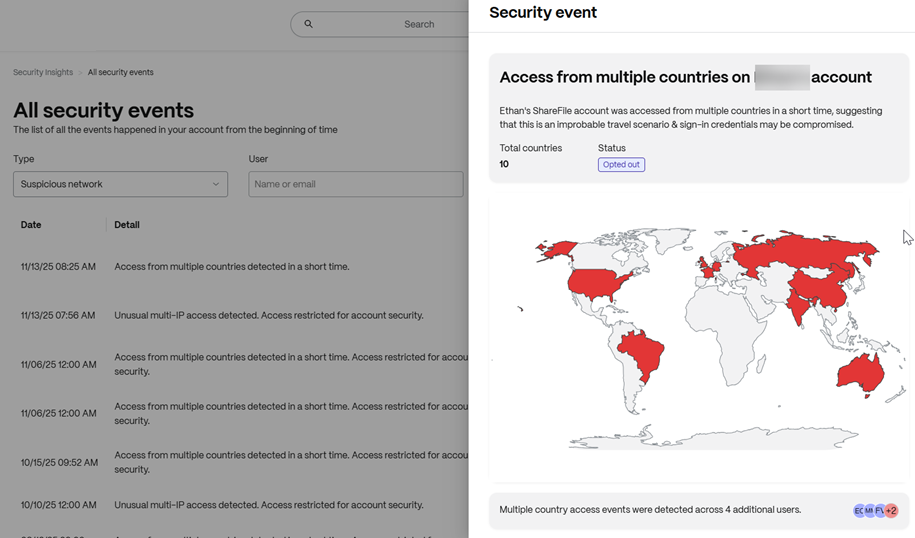
| Unusual geographic activity | Unexpected account access or downloads from multiple countries within a short period may indicate unauthorized access. Someone may have obtained your credentials through phishing or another method. |
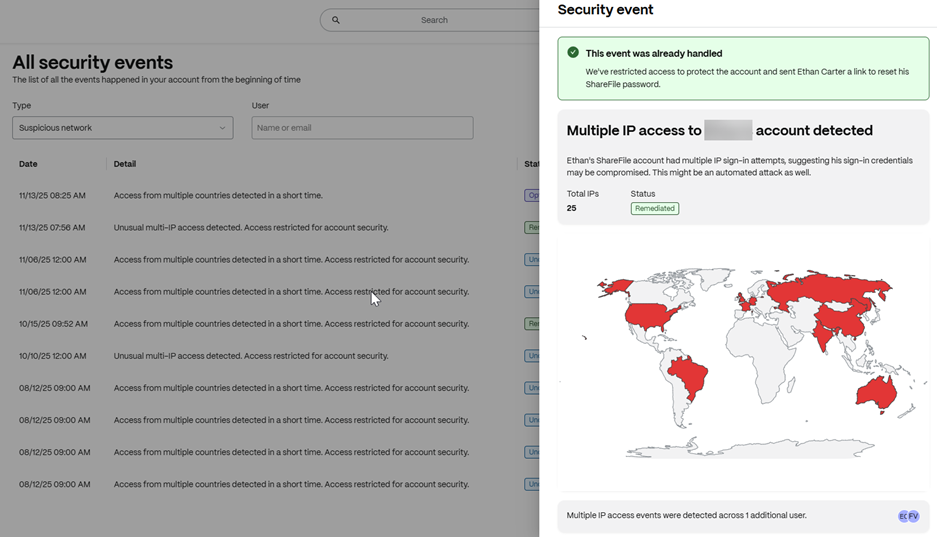
| Accessing from multiple IPs | A significant increase in the number of IP addresses used to access an account may indicate a change in behavior. |
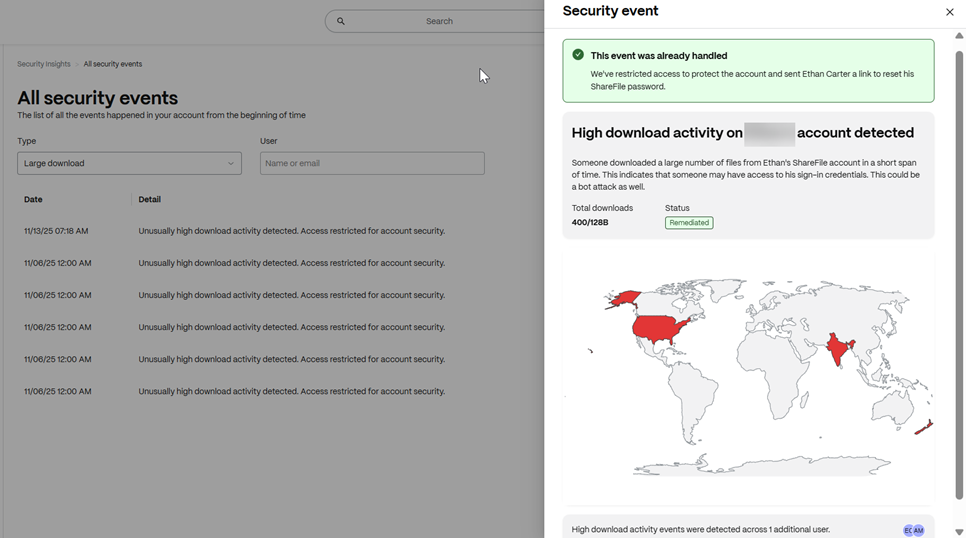
| High downloads | An unusual increase in download activity may indicate a change in how an account is being used. |
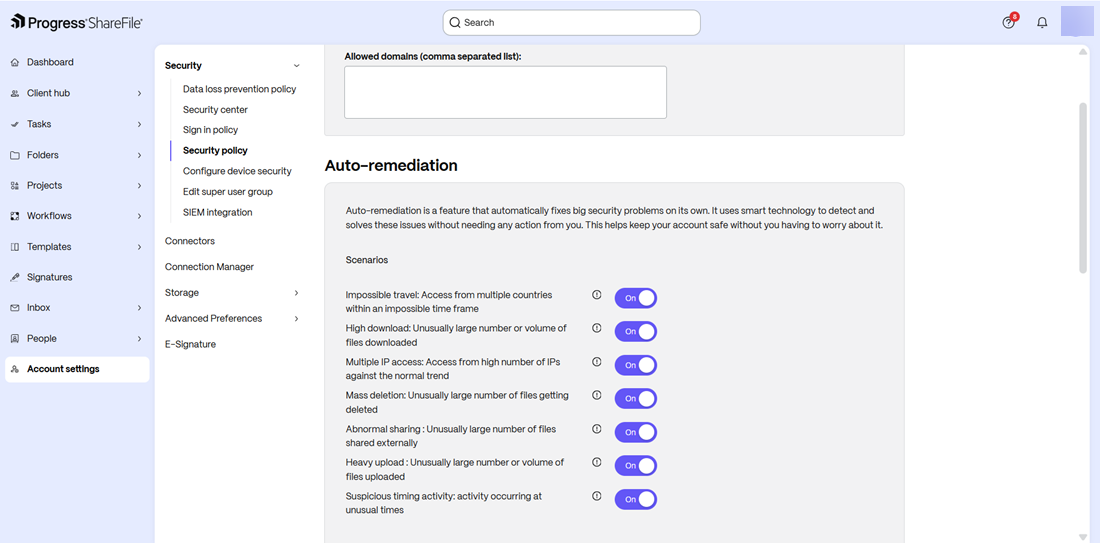
ShareFile Enterprise also adds alerts for unusual deletion, external sharing, upload, and activity timing:
| Alert | What it means |
|---|---|
| Mass deletion | An unusually large number of files are deleted. |
| Abnormal sharing | An unusually large number of files are shared externally. |
| Heavy upload | An unusually large number or volume of files are uploaded. |
| Suspicious timing activity | Activity occurs at unusual times. |
Trend change detection
A trend change is a significant shift in a user's typical behavior pattern. For example, a user may suddenly access their account from many IP addresses or download a large volume of data.
Consider the business context
Unusual activity can have a legitimate explanation. Planned cleanup may involve many deletions, a client project may require extensive external sharing, and a migration may involve a large upload. A change in work schedules may also explain activity at unusual times.
Check whether the activity was expected and authorized before deciding that no further action is needed.
Remediation actions and notifications
ShareFile continuously monitors for unusual activity and uses security protocols tailored to the nature and severity of a threat. These measures are designed to neutralize threats while minimizing disruption.
When an action is taken, notifications are sent by email to:
- The affected user, with details about the threat and the steps needed to restore account security.
- The account owner, so they can review the incident and take any additional action.
For trend-change alerts, the account administrator's email includes details about the activity and the username.
ShareFile mandates a password reset for the following activity:
- Login attempts from multiple countries within a short period.
- Unusual downloads from multiple countries within a specific duration.
- Trend changes involving access from many IP addresses or heavy downloads.
For trend changes, ShareFile expires the user's current password. In all these scenarios, the user cannot log in until they create a new password.
Review an alert
-
If you are an administrator, review the alert and consider the following questions:
- Does the activity match an expected project, migration, cleanup, or change in working hours?
- Does the affected user recognize the activity?
- Is there other unexpected activity that needs attention?
Use Security Center to investigate alerts and review available response options. See that article for navigation, investigation tools, and administrator actions.
-
If you are an affected user, follow the instructions in your alert notification. Change your password immediately if the alert requires a reset, and contact your administrator if you do not recognize the activity.
Remediation visibility
Remediation Visibility provides details about autoremediated security alerts so you can understand and respond to potential threats:
- Impossible Travel: View the number and locations of countries involved on a map.
- Accessing from Multiple IPs: View the IP addresses used to sign in and the activity trend for specific dates.
- High Downloads: View the total number of downloads and the activity trend for specific dates.
Opt out of remediation scenarios
Only account administrators, who are the owners of the accounts, can disable specific automated threat remediation scenarios in their security settings.
When you opt out of a scenario, it is no longer active for the account and its security measure is not applied. You can re-enable the scenario at any time.
If you opt out of trend change detection, trend change alerts and automatic password resets are not applied to your users.