Signatures
ShareFile delivers an electronic signature ability using Signatures. An electronic signature, sometimes known as an e-signature, is the same as your handwritten signature on a paper document, except electronic — a mark on an electronic contract or document you make to demonstrate your intent to agree to the terms of that document.
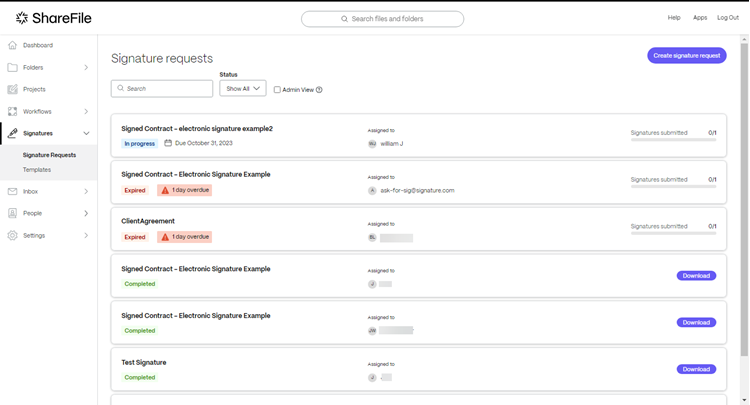
Integrating Signatures with ShareFile gives you the power to obtain legally binding signatures on documents entirely online, being completed more quickly and securely than executing paper documents.
-
Search supports querying Signature requests by Signature Request name, signer name, or signer email address.
-
Filter allows Signature requests to be filtered by status, including In Progress, Completed, Expired, Declined, Voided, Draft, and Revision in Progress, with support for multi-selecting multiple statuses at once.
-
Admin view provides Admin users with account-level visibility into all Signature requests created within the account.
Note:
Native e-signature notifications use the noreply@sf-notifications.com email address.
User guidance for Signatures
The following lists commonly used actions in Signatures. Select from the list to learn more about a particular function or feature.