This content has been machine translated dynamically.
Dieser Inhalt ist eine maschinelle Übersetzung, die dynamisch erstellt wurde. (Haftungsausschluss)
Cet article a été traduit automatiquement de manière dynamique. (Clause de non responsabilité)
Este artículo lo ha traducido una máquina de forma dinámica. (Aviso legal)
此内容已经过机器动态翻译。 放弃
このコンテンツは動的に機械翻訳されています。免責事項
이 콘텐츠는 동적으로 기계 번역되었습니다. 책임 부인
Este texto foi traduzido automaticamente. (Aviso legal)
Questo contenuto è stato tradotto dinamicamente con traduzione automatica.(Esclusione di responsabilità))
This article has been machine translated.
Dieser Artikel wurde maschinell übersetzt. (Haftungsausschluss)
Ce article a été traduit automatiquement. (Clause de non responsabilité)
Este artículo ha sido traducido automáticamente. (Aviso legal)
この記事は機械翻訳されています.免責事項
이 기사는 기계 번역되었습니다.책임 부인
Este artigo foi traduzido automaticamente.(Aviso legal)
这篇文章已经过机器翻译.放弃
Questo articolo è stato tradotto automaticamente.(Esclusione di responsabilità))
Translation failed!
AI-powered Document Request List generation - Beta
Article applies to:
- ShareFile Employee users

You can use AI in ShareFile to quickly and effortlessly create document requests lists that are tailored to your specific needs. Our new AI-powered document request list generation feature takes the manual effort out of creating document request lists. By providing a prompt that outlines your need, you can automatically generate precise document request lists.
AI-powered document request list generation is available as a beta release with access limited to ShareFile Premium and Industry Advantage customers. Specific pricing and packaging for this feature will be announced upon general availability.
For more information on how to create a document request list for your specific needed, refer to Create a Document Request list using AI.
NOTE:
This AI-powered document request list generation beta release is provided “AS IS” without any warranties or indemnities of any kind, or any promises, or guarantees that this feature will be publicly announced or made generally available. This beta release can be suspended or terminated at any time by ShareFile in its sole discretion with or without notice to customers.
Disable the feature
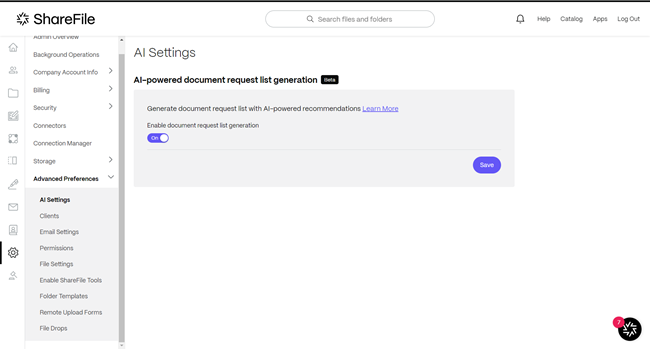
An administrator can disable the AI-powered document request list generation feature by following the below steps:
-
Navigate to Account settings > Advanced Preferences > AI Settings > AI-powered document request list generation.
-
Select the toggle to disable AI-powered document request list generation.
Get started with prompts
To get the most effective and relevant document request list, briefly describe the scenario or context for which the documents are required (e.g., individual tax prep, estate planning, patient onboarding, financial advisory). Here are some simple steps to get you started.
- Prepare your initial prompt: Begin with a small prompt detailing a high-level request. For example: “Generate a list of documents required for a mortgage application.”
- Generate your list: Input your prompt and hit ‘Generate’. The AI will create an initial list based on your input.
- Review and refine: Review the generated list to ensure it meets your needs. If it’s not quite what you were looking for, you can easily edit details and tweak the prompt to nudge the AI in the right direction.
Example prompts
Accounting - Individual Tax Prep: “List all the essential documents needed for preparing individual tax returns including income statements, deduction records, tax forms from previous years, and any relevant financial documentation.”
Legal - Estate Planning: “Generate a comprehensive list of documents required for estate planning. Include wills, trusts, beneficiary designations, power of attorney, healthcare directives, and any other legal documentation that needs to be reviewed.”
Healthcare - Patient Onboarding: “Create a detailed checklist of documents a new patient should provide during the onboarding process at a medical clinic. Include medical histories, insurance information, consent forms, identification documents, and any specialist referrals.”
Financial - Financial Advisory: “Compile a list of documents necessary for a client to start a financial advisory relationship. Include identification documents, financial statements, proof of income, investment goals, risk assessment forms, and any legal disclosures.”
FAQs
Does ShareFile use or store any of my data for its AI capabilities?
No, ShareFile does not use your data or the prompt you provide to train underlying AI/ML technologies.
Share
Share
In this article
This Preview product documentation is Citrix Confidential.
You agree to hold this documentation confidential pursuant to the terms of your Citrix Beta/Tech Preview Agreement.
The development, release and timing of any features or functionality described in the Preview documentation remains at our sole discretion and are subject to change without notice or consultation.
The documentation is for informational purposes only and is not a commitment, promise or legal obligation to deliver any material, code or functionality and should not be relied upon in making Citrix product purchase decisions.
If you do not agree, select I DO NOT AGREE to exit.