This content has been machine translated dynamically.
Dieser Inhalt ist eine maschinelle Übersetzung, die dynamisch erstellt wurde. (Haftungsausschluss)
Cet article a été traduit automatiquement de manière dynamique. (Clause de non responsabilité)
Este artículo lo ha traducido una máquina de forma dinámica. (Aviso legal)
此内容已经过机器动态翻译。 放弃
このコンテンツは動的に機械翻訳されています。免責事項
이 콘텐츠는 동적으로 기계 번역되었습니다. 책임 부인
Este texto foi traduzido automaticamente. (Aviso legal)
Questo contenuto è stato tradotto dinamicamente con traduzione automatica.(Esclusione di responsabilità))
This article has been machine translated.
Dieser Artikel wurde maschinell übersetzt. (Haftungsausschluss)
Ce article a été traduit automatiquement. (Clause de non responsabilité)
Este artículo ha sido traducido automáticamente. (Aviso legal)
この記事は機械翻訳されています.免責事項
이 기사는 기계 번역되었습니다.책임 부인
Este artigo foi traduzido automaticamente.(Aviso legal)
这篇文章已经过机器翻译.放弃
Questo articolo è stato tradotto automaticamente.(Esclusione di responsabilità))
Translation failed!
What’s new in ShareFile documentation
A goal of ShareFile is to deliver new features and product updates to ShareFile customers when available.
To you, the customer, this process is transparent. Initial updates are applied to ShareFile internal sites only, and are then applied to customer environments gradually. Delivering updates incrementally in waves helps to ensure product quality and to maximize the availability.
May 14, 2026
Create Signature Request In ShareFile For Outlook Online
The ShareFile Outlook Online add‑in lets you send documents for electronic signature or sign documents yourself—directly from Outlook, without leaving your inbox or compose experience. For more information go to Signature Request In ShareFile For Outlook Online
April 16, 2026
ShareFile for Mac - Re-Authentication
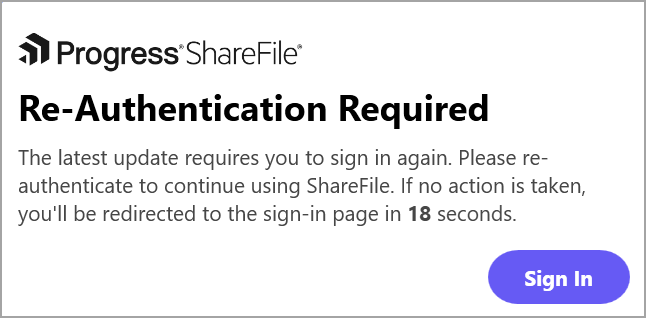
Upgrading to the latest version of ShareFile for Mac 26.04.20 will require the users to re-authenticate. For more information, go to ShareFile for Mac.
Note:
If no action is taken, the login flow will automatically redirect once the timer expires.
April 7, 2026
ShareFile for Windows - Projects, Client Hub & Solutions
ShareFile for Windows now provides access to files and folders belonging to Projects, Client Hub & Solutions for all users present on the Premium plan. This will be available for all Premium users version 26.03.12.0 onwards. For more information go to ShareFile for Windows - Projects, Client Hub & Solutions.
Note:
Upgrading to the latest version of ShareFile for Windows 26.3.12.0 will require the users to re-authenticate.
April 1, 2026
Bulk client entity creation - Client Hub
ShareFile Admins and Employees can create multiple client entities and their primary contacts at once within the ShareFile Client Hub.
For more information, go to Bulk client entity creation - Client Hub
March 5, 2026
Transparent Progress on Long-Running Automation Processes
Transparent Automation Progress by ShareFile gives users confidence that the process automations are working as expected by surfacing real-time status, progress, and outcomes directly in the ShareFile UI. Users can clearly see when an automation starts, is running, completes, or fails, reducing uncertainty, duplicate actions, and support requests.
For more information, go to Transparent Progress on Long-Running Automation Processes
January 27, 2026
Sessions
- New Sessions page - Users can view all active sessions in the new Sessions sub‑navigation under Personal Settings.
- Admin session management - Admins have access to a Manage Sessions option on any user’s profile, allowing them to view and manage that user’s active sessions.
- Sign out after password change - When updating their password, users have the option to sign out of all existing sessions once the password change is complete. For details, see Change password.
December 4, 2025
Security Insights For ShareFile
ShareFile has introduced a visual, data-rich security dashboard for admins. When a security event occurs, ShareFile sends multiple notifications to both users and admins. To consolidate this, the Security Insights dashboard now provides real-time alerts, event breakdowns, geographic context, remediation statuses, and granular user-level insights.
For more information, go to Security Insights.
December 3, 2025
ShareFile authentication - One-time codes
Administrators can enable ShareFile one-time codes to provide client users with a secure and convenient authentication method.
For more information, see ShareFile authentication - One-time codes.
December 3, 2025
Social Sign In - Microsoft integration
Administrators can enable Microsoft as the social sign-in provider, allowing client contacts to authenticate to ShareFile using their Microsoft account.
For more information, see Social sign in.
November 10, 2025
Client Hub - Custom Fields
Custom fields empower administrators to tailor the platform to their specific operational needs by enabling the addition of unique data fields.
For more information, see Client Hub - Custom Fields.
October 16, 2025
Outlook Online Email Recipients Sign-In
ShareFile now enables recipients to authenticate before they can access content on Outlook. For new users who do not have a ShareFile account, an activation link will be provided where they have to create a new ShareFile account in order to access sensitive content.
For more information, see Sending Files, Sending Converted Attachments, Request Files and Sending Encrypted Emails to Outlook email recipients.
September 20, 2025
Brand Update: Progress ShareFile
ShareFile will officially become Progress ShareFile, aligning with the Progress brand identity.
ShareFile-related marketing, billing, webinar and business emails will come from:
- progress@products.progress.com
- progress@inform.progress.com
Emails related to product usage —such as reports, upload/download alerts, activity notifications and file send/request actions—will continue to be delivered as usual. No changes or actions are required.
September 19, 2025
Storage Zone Controller 6.0.1
This new SZC v6.0.1 release introduces Progress Branding changes and security improvements and bug fixes.
For more information, see About storage zones controller.
September 16, 2025
ShareFile for Clients Mobile Applications
ShareFile for Clients mobile applications are a fast and smart way to securely exchange files and information with the businesses and professionals you trust.
For more information, see ShareFile for Clients- iOS App and ShareFile for Clients- Android App.
September 15, 2025
Closed Project Behaviour in ShareFile
ShareFile project owners can now close projects and all the information inside the project becomes read-only and non-editable and marks all cases as closed. This will help ensure data integrity and meet both internal policy and legal requirements for data retention.
For more information, see Closed Project Behaviour
August 20, 2025
ShareFile Solutions - Income Tax Return solution
This release improves functionality by including the following enhancement:
- Create payment requests - this allows payment requests to be created within Engagements, allowing service providers to send payment requests directly from ShareFile to their clients. For more information, see Create payment requests.
August 20, 2025
In-App Security Notifications in ShareFile
ShareFile now provides Security Notifications which are now available in-app in addition to email, providing a faster and more seamless way to stay informed about important security events.
For more information, see In-App Security Notifications.
August 11, 2025
ShareFile 25.7.4.0 for Windows
ShareFile for Windows now supports devices powered by ARM-based processors.
For more information, see ShareFile for Windows.
August 7, 2025
AI Driven Document Validation
AI Document Validation helps verify that the files your clients upload match your requests when documents are submitted through a request.
For more information, see AI Driven Document Validation.
July 31, 2025
Document Request List
We’ve redesigned the Document Request List experience to make reviewing, uploading, and managing documents faster and more intuitive. This new layout helps you focus on the work that matters—without digging through cluttered menus or guessing where your documents are.
For more information, see Document requests options.
July 15, 2025
Storage Zone Controller 6.0
This new SZC v6.0 release introduces significant performance, security, and usability improvements. This release is built on modern .Net core and streamlines configuration and deployment of SZCs.
For more information, see About storage zones controller.
June 30, 2025
ShareFile 25.6.5.0 for Windows
This release addresses issues that improve overall performance and stability.
For more information, see ShareFile for Windows.
Note:
This release is signed with Progress Software Corporation’s digital certificate. In some IT environments where software installations are restricted or centrally managed, this update may be blocked. If that happens, please contact your IT team and ask them to add ‘Progress Software Corporation’ to the trusted publishers list ahead of time.
June 4, 2025
Client Hub (Beta)
The Client Hub feature allows Administrators to manage client lists efficiently within ShareFile.
For more information, see Client Hub.
Share
Share
In this article
- May 14, 2026
- April 16, 2026
- April 7, 2026
- April 1, 2026
- March 5, 2026
- January 27, 2026
- December 4, 2025
- December 3, 2025
- December 3, 2025
- November 10, 2025
- October 16, 2025
- September 20, 2025
- September 19, 2025
- September 16, 2025
- September 15, 2025
- August 20, 2025
- August 20, 2025
- August 11, 2025
- August 7, 2025
- July 31, 2025
- July 15, 2025
- June 30, 2025
- June 4, 2025
This Preview product documentation is Citrix Confidential.
You agree to hold this documentation confidential pursuant to the terms of your Citrix Beta/Tech Preview Agreement.
The development, release and timing of any features or functionality described in the Preview documentation remains at our sole discretion and are subject to change without notice or consultation.
The documentation is for informational purposes only and is not a commitment, promise or legal obligation to deliver any material, code or functionality and should not be relied upon in making Citrix product purchase decisions.
If you do not agree, select I DO NOT AGREE to exit.